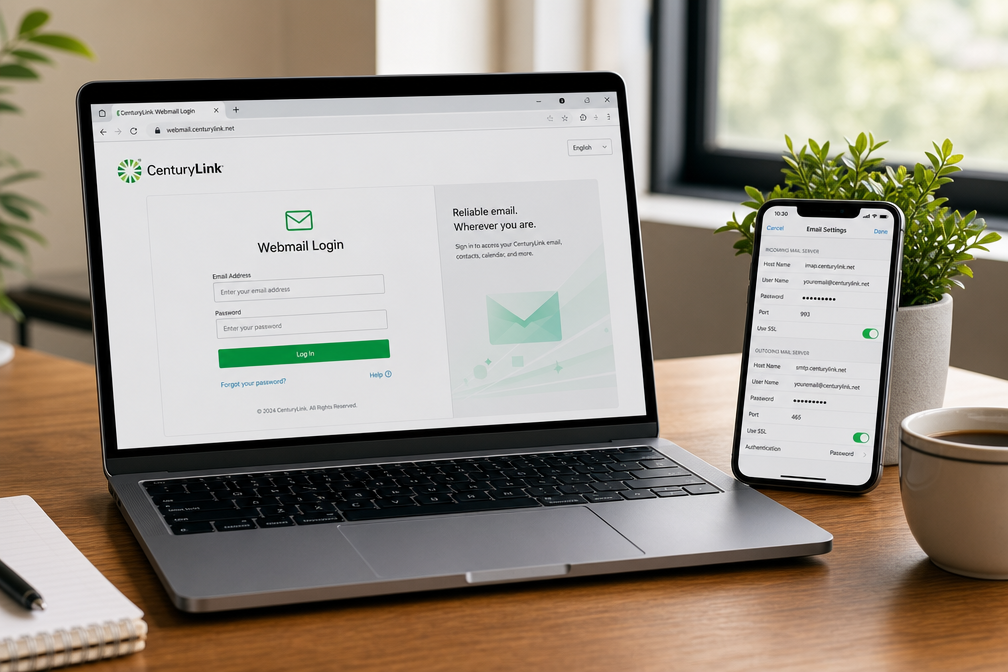
CenturyLink email gives you a secure way to manage communication, billing, and account services from one place. You can log in through the home page or webmail portal, set up your account on mobile apps, and configure IMAP/SMTP settings for Outlook or Gmail. New users can create addresses through the My CenturyLink App, while existing customers can reset passwords, organize inboxes, and adjust spam filters. Brightspeed customers in transitioned states have their own login portal. This guide explains every step so you can access, secure, and optimize your CenturyLink email without confusion.
Why Should You Use CenturyLink Email?
CenturyLink offers every customer a free @centurylink.net email address. You also gain access to the CenturyLink.net portal, which combines email, billing, account management, and news updates. That makes it more than just an inbox — it is a central hub for your digital services.
Industry data shows that over 70% of ISP customers prefer integrated portals for email and billing because it reduces login friction and improves account security (Statista, 2025).
Where Do You Log In to CenturyLink Email?
You have two secure login options:
- CenturyLink Home Page Login → centurylink.net
- CenturyLink Webmail Login → webmail.centurylink.net
Step‑by‑Step Login Instructions
- Open Chrome, Firefox, Safari, or Edge.
- Go to centurylink.net and click Email in the top right.
- Shortcut: go directly to webmail.centurylink.net.
- Enter your full email address and password.
- Click Log In to reach your inbox.
How Do You Create a New CenturyLink Email Address?
Account creation is only available through the My CenturyLink App:
- Download and install the app.
- Sign in with your account number and billing ZIP code.
- Tap My Services → CenturyLink Email.
- Select Create Email Account.
- Enter your desired username and secure password.
- Verify your identity with a mobile code.
- Add a recovery email.
- Confirm to activate your new address.
What Are the Correct IMAP and SMTP Settings?
To set up CenturyLink email on Outlook, Gmail, or mobile apps, use these verified server settings:
| Type | Server | Port | Security |
| Incoming (IMAP) | mail.centurylink.net | 993 | SSL/TLS |
| Outgoing (SMTP) | smtp.centurylink.net | 465 or 587 | SSL/TLS |
Always enter your full email address and password during setup.
How Can You Reset Your Password?
- Visit webmail.centurylink.net.
- Click Forgot Password?.
- Enter your email address.
- Verify identity via recovery phone or email.
- Set a new password and log in again.
What Settings Improve Your Email Experience?
After login, you can:
- Create folders for organization.
- Apply filters to auto‑sort emails.
- Block unwanted senders.
- Adjust spam protection.
- Update recovery options.
What Issues Do Users Face and How Can You Fix Them?
- Page not loading → Clear cache/cookies or switch browsers.
- Incorrect password → Check case sensitivity.
- Account locked → Wait 30 minutes or reset password.
- Browser errors → Update to the latest version.
How Do You Keep Your Account Secure?
- Enable multi‑factor authentication (MFA).
- Use a unique password and update it regularly.
- Avoid public Wi‑Fi for login.
- Always sign out on shared devices.
- Watch for phishing attempts.
Cybersecurity reports confirm that phishing accounts for 36% of email breaches globally (Verizon DBIR, 2025).
What If You Are in a Brightspeed Transition Area?
CenturyLink’s local exchange business has been acquired by Brightspeed in several states. Customers in those regions must use the Brightspeed Webmail login instead of CenturyLink.
Final Takeaway
CenturyLink email is more than a mailbox. It is a gateway to your services, billing, and account security. By following this guide, you can:
- Create new accounts with confidence.
- Log in securely from any device.
- Troubleshoot issues quickly.
- Optimize settings for better management.
Keep this resource as your complete reference for CenturyLink email in 2026.
Explore fresh ideas, smart insights, and the future of innovation at Xkolab.