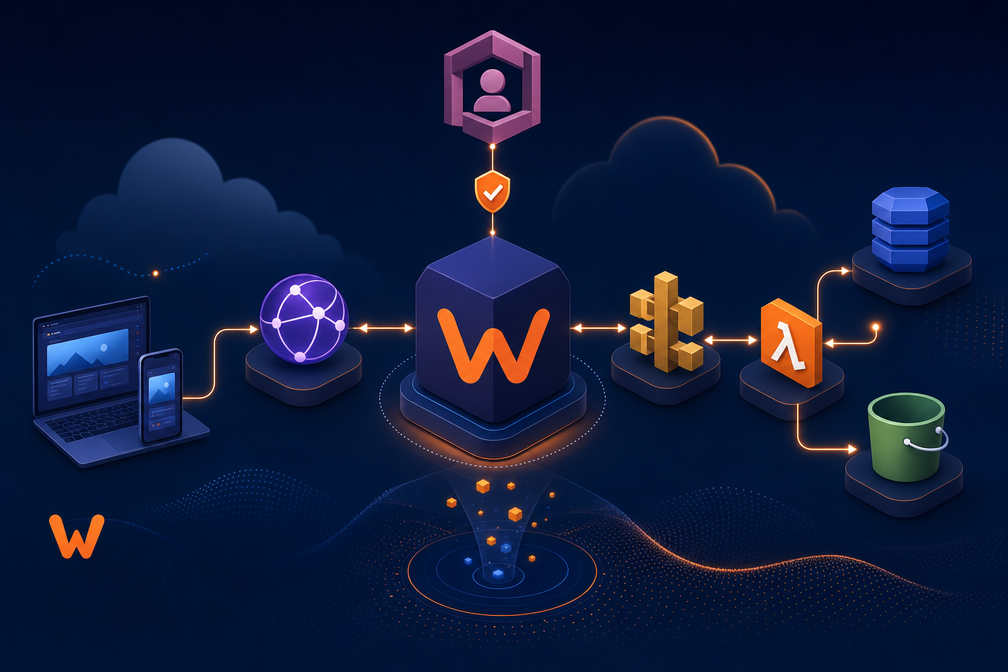
Webiny puts your CMS inside your AWS account. You keep full control of data and infrastructure. The platform uses AWS Lambda, DynamoDB, S3, and CloudFront and exposes content through a GraphQL API. Do you want a headless CMS that favors developer control and enterprise security?
What is Webiny?
Webiny is a serverless, open‑source CMS built for enterprises and developer teams.
It runs on your AWS account and gives you full data ownership.
It uses Lambda, DynamoDB, S3, and CloudFront to scale automatically.
Do you need a headless CMS that keeps data on your cloud rather than a third‑party SaaS?
Quick fact: Webiny is open source and free to start.
What features does Webiny offer?
Webiny provides a headless CMS with a GraphQL API.
You can model content and expose auto‑generated endpoints.
A page builder offers drag‑and‑drop page creation for landing pages and microsites.
A form builder captures leads and survey responses.
A file manager handles digital assets.
Multi‑tenant support lets you run multiple sites from one instance.
Role‑based access and SSO secure team workflows.
A publishing workflow supports staged approvals and scheduled releases.
Quick fact: GraphQL API access speeds frontend integration and reduces backend work.
How much does Webiny cost and how do reviewers rate it?
You can self‑host Webiny at no license cost.
Enterprise plans carry custom pricing for large teams.
Some vendors list $9 per user per month for advanced hosted features.
Review platforms show strong user satisfaction, often around 4.5 out of 5.
Do you prefer a free self‑hosted stack or a paid enterprise plan with support?
Statistic: Many teams report lower infrastructure costs after moving to serverless architectures.
Is Webiny safe and what risks should you consider?
Hosting in your AWS account gives you full control over data and security.
You can apply your own IAM policies and encryption standards.
You avoid third‑party data custody risks that come with SaaS platforms.
A tradeoff exists in vendor lock‑in to AWS services.
You need developer expertise to deploy and maintain the stack.
Risk note: AWS lock‑in can affect migration options and long‑term vendor flexibility.
How do you deploy and use Webiny?
Deploy Webiny with infrastructure as code tools such as Pulumi.
Set up an AWS account and follow the deployment guide.
Create content models in the admin UI.
Use the GraphQL API to connect your frontend.
Build pages with the page builder and manage assets in the dashboard.
Monitor costs in AWS and tune DynamoDB and Lambda settings as traffic grows.
Quick tip: Start with a small proof of concept to measure cost and performance.
What are the main Webiny alternatives and how do they compare?
| Platform | Hosting | Strength | Rating |
| Webiny | AWS serverless | Data ownership; scalability | 4.5/5 |
| Kontent.ai | SaaS | Enterprise features; managed service | 4.5/5 |
| Agility CMS | SaaS | Flexible content models | 4.4/5 |
| Adobe Experience Manager | SaaS | Enterprise scale; rich features | 4.3/5 |
Which option fits your team depends on your cloud strategy and developer resources.
Do you want full control or a managed experience?
Statistic: Enterprises often choose SaaS for lower operational overhead and serverless for cost efficiency at scale.
How should you decide if Webiny fits your project?
List your priorities first.
Choose Webiny if you value data ownership, AWS integration, and customization.
Choose a SaaS alternative if you prefer managed support and faster onboarding.
Estimate total cost of ownership across hosting, development, and support.
Run a short pilot to validate performance and cost assumptions.
Action step: Create a 30‑day pilot plan that measures deployment time, monthly cost, and developer hours.
FAQ
What types of projects suit Webiny best?
Enterprise sites, multi‑site platforms, and projects that require strict data control.
Can you host Webiny outside AWS?
Webiny targets AWS serverless services. Hosting outside AWS requires major changes.
How steep is the learning curve?
Developer teams with AWS experience adapt quickly. New teams need ramp time.
Where can you find support?
Community forums, GitHub, and enterprise support plans provide help.
xkolab: Where Ideas Become Digital Success.